

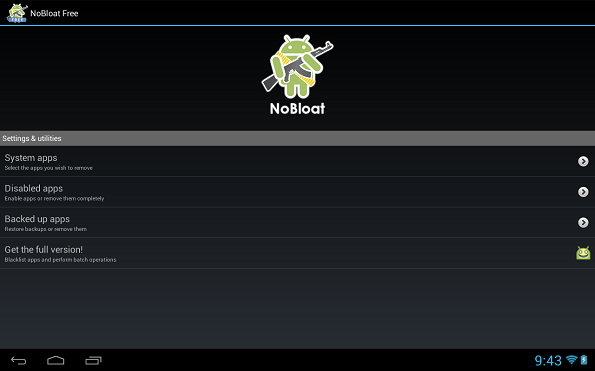
 It has a free version with the following features:
- Disabling and enabling system apps
- Creating backups of system apps and restoring them
- Deleting system apps
It also has a full (paid) version including the following features:
- Creating a blacklist of system apps to delete
- Batch operation to backup/remove all blacklisted system apps
- Batch operation to enable all disabled system apps
- Batch operation to restore all backups
- Export your settings and blacklist to the external storage to import them later
- Quickly find apps using the search functionality
- Change backup folder location
Here are a few things to keep in mind while using NoBloat:
- If you have issues uninstalling apps, try uninstalling the app's updates or enabling USB debugging.
- In order to use NoBloat you need root access. If you do not know what root access means, you probably don't have it.
- Be aware that in order to update your version of Android, you might need all original apps in place. It is advised to always have a backup of deleted apps or to just disable them so you can restore them later.
So now you may kiss all the worries related to unwanted apps goodbye. Now that you have rooted your android device, NoBloat is at your service. It is here to make sure that you get to witness only those icons on your home screen that are of use to you. It will easily dispose off the rest so that your phone does not clutter up with useless pre installed apps.
It has a free version with the following features:
- Disabling and enabling system apps
- Creating backups of system apps and restoring them
- Deleting system apps
It also has a full (paid) version including the following features:
- Creating a blacklist of system apps to delete
- Batch operation to backup/remove all blacklisted system apps
- Batch operation to enable all disabled system apps
- Batch operation to restore all backups
- Export your settings and blacklist to the external storage to import them later
- Quickly find apps using the search functionality
- Change backup folder location
Here are a few things to keep in mind while using NoBloat:
- If you have issues uninstalling apps, try uninstalling the app's updates or enabling USB debugging.
- In order to use NoBloat you need root access. If you do not know what root access means, you probably don't have it.
- Be aware that in order to update your version of Android, you might need all original apps in place. It is advised to always have a backup of deleted apps or to just disable them so you can restore them later.
So now you may kiss all the worries related to unwanted apps goodbye. Now that you have rooted your android device, NoBloat is at your service. It is here to make sure that you get to witness only those icons on your home screen that are of use to you. It will easily dispose off the rest so that your phone does not clutter up with useless pre installed apps.
NoBloat - To Make Sure That Your Device is Not Stuffed with Unwanted Apps
3 min read
Gluttony is common in humans as well as in things controlled by humans. The companies that make wonderful android devices might or might not be overeating but they definitely overfeed the devices that they make with lots and lots of apps, most of which never get used. Then there is rooting. The most common reason for us to root our devices is for an enhanced performance. The second most common reason is to get rid of the unwanted pre-installed applications,
If you agree with me and are wondering how to go about it, there is this app which is called NoBloat - because overeating is bad, for us and our devices. And consuming things that we don’t even like is the worst. Thus, NoBloat is your phone’s personal dietician who will make sure that your phone does not bloat up.
NoBloat lets you delete unwanted apps that come pre-installed with your phone. Simply select the bloatware that you want to get rid of and click delete. NoBloat can automatically place backups on your external storage which you can restore at any time. Remember, though: Always have a backup of your phone. Important features might break when deleting system apps. Using the blacklist from the full version, you can swiftly get rid of all bloatware after installing a new ROM. When wiping your phone's data, you can export your blacklist to import it on your new ROM.
It has a free version with the following features:
- Disabling and enabling system apps
- Creating backups of system apps and restoring them
- Deleting system apps
It also has a full (paid) version including the following features:
- Creating a blacklist of system apps to delete
- Batch operation to backup/remove all blacklisted system apps
- Batch operation to enable all disabled system apps
- Batch operation to restore all backups
- Export your settings and blacklist to the external storage to import them later
- Quickly find apps using the search functionality
- Change backup folder location
Here are a few things to keep in mind while using NoBloat:
- If you have issues uninstalling apps, try uninstalling the app's updates or enabling USB debugging.
- In order to use NoBloat you need root access. If you do not know what root access means, you probably don't have it.
- Be aware that in order to update your version of Android, you might need all original apps in place. It is advised to always have a backup of deleted apps or to just disable them so you can restore them later.
So now you may kiss all the worries related to unwanted apps goodbye. Now that you have rooted your android device, NoBloat is at your service. It is here to make sure that you get to witness only those icons on your home screen that are of use to you. It will easily dispose off the rest so that your phone does not clutter up with useless pre installed apps.
It has a free version with the following features:
- Disabling and enabling system apps
- Creating backups of system apps and restoring them
- Deleting system apps
It also has a full (paid) version including the following features:
- Creating a blacklist of system apps to delete
- Batch operation to backup/remove all blacklisted system apps
- Batch operation to enable all disabled system apps
- Batch operation to restore all backups
- Export your settings and blacklist to the external storage to import them later
- Quickly find apps using the search functionality
- Change backup folder location
Here are a few things to keep in mind while using NoBloat:
- If you have issues uninstalling apps, try uninstalling the app's updates or enabling USB debugging.
- In order to use NoBloat you need root access. If you do not know what root access means, you probably don't have it.
- Be aware that in order to update your version of Android, you might need all original apps in place. It is advised to always have a backup of deleted apps or to just disable them so you can restore them later.
So now you may kiss all the worries related to unwanted apps goodbye. Now that you have rooted your android device, NoBloat is at your service. It is here to make sure that you get to witness only those icons on your home screen that are of use to you. It will easily dispose off the rest so that your phone does not clutter up with useless pre installed apps.

One Click Root Author
Newsletter
Get the latest tech news delivered to your inbox weekly.