

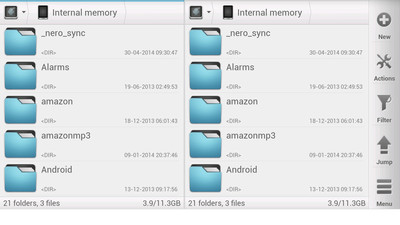
 If you're looking for a root explorer, this file manager will meet your needs. It features a root explorer with ability to change system level file properties. You don't need to remember about mounting file systems as read/write. Solid Explorer will do it for you automagically.
Solid Explorer is also a good tool for viewing your media. This file manager can stream music and videos from your PC or cloud without a need to download it. You can even cast the stream to Chromecast. With this file explorer you will also receive a very elegant UI look with many customization options, such as dynamic list resizing with pinch gesture or custom color schemes, which will even change the file icon colors.
Here is a full list of all of its features:
- Two independent panels serve as file browsers
- Drag and Drop inside and between panels
- FTP client with support for secure connections
- SFTP client
- WebDav client capable of connecting to Owncloud and Yandex
- SMB/CIFS client allows for browsing network folders shared with Windows file sharing
- FTP server for sharing files to your PC
- Ability to read and extract ZIP, RAR and TAR archives
- Ability to create TAR archives and password protected ZIP archives
- Many cloud clients: Dropbox, Box, SkyDrive (One Drive), Google Drive, Sugarsync, Copy, Mediafire, Owncloud (through WebDav), Yandex (through WebDav)
- Root access makes Solid Explorer fully functional root explorer
- Indexed search finds your files in a couple of seconds
- Detailed file information with storage usage statistics
I don’t think one finds an amazing app - in terms of both features as well as looks - very frequently. This is the best file manager and the best looking foe manager for your rooted android device!
If you're looking for a root explorer, this file manager will meet your needs. It features a root explorer with ability to change system level file properties. You don't need to remember about mounting file systems as read/write. Solid Explorer will do it for you automagically.
Solid Explorer is also a good tool for viewing your media. This file manager can stream music and videos from your PC or cloud without a need to download it. You can even cast the stream to Chromecast. With this file explorer you will also receive a very elegant UI look with many customization options, such as dynamic list resizing with pinch gesture or custom color schemes, which will even change the file icon colors.
Here is a full list of all of its features:
- Two independent panels serve as file browsers
- Drag and Drop inside and between panels
- FTP client with support for secure connections
- SFTP client
- WebDav client capable of connecting to Owncloud and Yandex
- SMB/CIFS client allows for browsing network folders shared with Windows file sharing
- FTP server for sharing files to your PC
- Ability to read and extract ZIP, RAR and TAR archives
- Ability to create TAR archives and password protected ZIP archives
- Many cloud clients: Dropbox, Box, SkyDrive (One Drive), Google Drive, Sugarsync, Copy, Mediafire, Owncloud (through WebDav), Yandex (through WebDav)
- Root access makes Solid Explorer fully functional root explorer
- Indexed search finds your files in a couple of seconds
- Detailed file information with storage usage statistics
I don’t think one finds an amazing app - in terms of both features as well as looks - very frequently. This is the best file manager and the best looking foe manager for your rooted android device!
Solid Explorer File Manager - Mixing Beauty with Efficiency
4 min read
Yes, it is true that it is the inner beauty that matters the most and should be given more importance but it is a fact that human nature is to get attracted to something visually appealing. This is true if we talk about human interaction and it is also true when we talk about our interaction with our gadgets and everything else that we pick out for ourselves, for that matter.
When we buy our devices, we carefully decide to buy the one which has a good balance of features and looks. Not too many people are out there who buy a not-so-good looking device just because of its features. There are, however, many people who buy gadgets just on the basis of looks, even if that gadget is lacking in some vital feature. This proves the fact that looks do matter.
Therefore, when we are so particular about the looks of our devices, even at the cost of the features at times, we should make sure that the apps that we choose to download do justice to the hardware. Thus, if you are looking for an efficient file manager that is good to look at as well, say hello to Solid Explorer File Manager.
Solid Explorer is the nicest looking file manager with two independent panels that bring you a rejuvenated file browsing experience. It provides to you a wide support for cloud storage, including Dropbox, Box, Google Drive and One Drive. This file manager can connect to your Windows PC and many remote servers working with FTP, SFTP and WebDav. You will also appreciate ability to create and extract most commonly used archive formats.
Two independent panels allows for seamless file transfer with drag and drop. Just hold your finger on a file and drag it to other panel. In this way you can easily transfer files between various locations including PC shares, cloud and root folders.
If you're looking for a root explorer, this file manager will meet your needs. It features a root explorer with ability to change system level file properties. You don't need to remember about mounting file systems as read/write. Solid Explorer will do it for you automagically.
Solid Explorer is also a good tool for viewing your media. This file manager can stream music and videos from your PC or cloud without a need to download it. You can even cast the stream to Chromecast. With this file explorer you will also receive a very elegant UI look with many customization options, such as dynamic list resizing with pinch gesture or custom color schemes, which will even change the file icon colors.
Here is a full list of all of its features:
- Two independent panels serve as file browsers
- Drag and Drop inside and between panels
- FTP client with support for secure connections
- SFTP client
- WebDav client capable of connecting to Owncloud and Yandex
- SMB/CIFS client allows for browsing network folders shared with Windows file sharing
- FTP server for sharing files to your PC
- Ability to read and extract ZIP, RAR and TAR archives
- Ability to create TAR archives and password protected ZIP archives
- Many cloud clients: Dropbox, Box, SkyDrive (One Drive), Google Drive, Sugarsync, Copy, Mediafire, Owncloud (through WebDav), Yandex (through WebDav)
- Root access makes Solid Explorer fully functional root explorer
- Indexed search finds your files in a couple of seconds
- Detailed file information with storage usage statistics
I don’t think one finds an amazing app - in terms of both features as well as looks - very frequently. This is the best file manager and the best looking foe manager for your rooted android device!
If you're looking for a root explorer, this file manager will meet your needs. It features a root explorer with ability to change system level file properties. You don't need to remember about mounting file systems as read/write. Solid Explorer will do it for you automagically.
Solid Explorer is also a good tool for viewing your media. This file manager can stream music and videos from your PC or cloud without a need to download it. You can even cast the stream to Chromecast. With this file explorer you will also receive a very elegant UI look with many customization options, such as dynamic list resizing with pinch gesture or custom color schemes, which will even change the file icon colors.
Here is a full list of all of its features:
- Two independent panels serve as file browsers
- Drag and Drop inside and between panels
- FTP client with support for secure connections
- SFTP client
- WebDav client capable of connecting to Owncloud and Yandex
- SMB/CIFS client allows for browsing network folders shared with Windows file sharing
- FTP server for sharing files to your PC
- Ability to read and extract ZIP, RAR and TAR archives
- Ability to create TAR archives and password protected ZIP archives
- Many cloud clients: Dropbox, Box, SkyDrive (One Drive), Google Drive, Sugarsync, Copy, Mediafire, Owncloud (through WebDav), Yandex (through WebDav)
- Root access makes Solid Explorer fully functional root explorer
- Indexed search finds your files in a couple of seconds
- Detailed file information with storage usage statistics
I don’t think one finds an amazing app - in terms of both features as well as looks - very frequently. This is the best file manager and the best looking foe manager for your rooted android device!

One Click Root Author
Newsletter
Get the latest tech news delivered to your inbox weekly.