

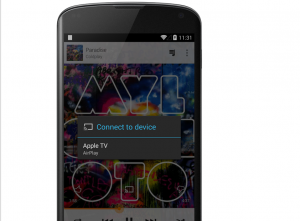
 Here’s how to use that feature to your advantage:
Step 1) Download and install DoubleTwist AirPlay for Android, which is available for $3.99 from the Play store
Step 2) Launch the Google Play Music app and tap the Cast (streaming) button
Step 3) When prompted, grant root access. This will patch the plugin whitelist.
Step 4) Force stop the Google Play Music app then relaunch.
Step 5) When you tap ‘Cast’, you should now see AirPlay devices on your Wi-Fi network.
Now here’s the bad news: the app isn’t free. It’s $3.99. It also requires rooting. If you haven’t already rooted your phone and aren’t willing to spend $3.99, then this may not be the best app for you.
However, it will work on wireless speakers as well as Apple TV. Any device that uses AirPlay is compatible with this app.
Here’s how to use that feature to your advantage:
Step 1) Download and install DoubleTwist AirPlay for Android, which is available for $3.99 from the Play store
Step 2) Launch the Google Play Music app and tap the Cast (streaming) button
Step 3) When prompted, grant root access. This will patch the plugin whitelist.
Step 4) Force stop the Google Play Music app then relaunch.
Step 5) When you tap ‘Cast’, you should now see AirPlay devices on your Wi-Fi network.
Now here’s the bad news: the app isn’t free. It’s $3.99. It also requires rooting. If you haven’t already rooted your phone and aren’t willing to spend $3.99, then this may not be the best app for you.
However, it will work on wireless speakers as well as Apple TV. Any device that uses AirPlay is compatible with this app.
New App Lets Android Users Play Music Over Apple TV
2 min read
A lot of Android users use Apple TV. Even for those who shy away from Apple products, Apple TV is a great deal.
It’s an affordably priced Netflix, video, sports, and music streaming machine. It’s not as affordable as Chromecast, but it has certainly been around much longer.
iPhone users can proudly stream music from their iPhone or iPad to Apple TV via iTunes, but Android users don’t get the same level of service.
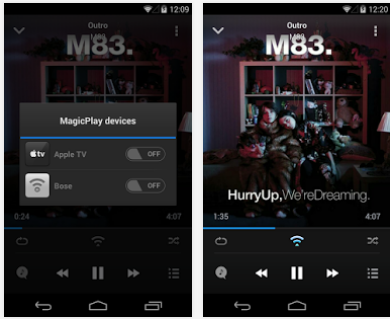
Finally, thanks to a new app, Android users can do exactly that. Today, we’re going to tell you about a magical new app called DoubleTwist which lets you play Android media over your Apple TV.
DoubleTwist has actually been around for a long time and has created a few useful Android music apps. However, the recent DoubleTwist update lets you use Airplay to stream music from your Android phone or tablet to wireless speakers and Apple TV.
Here’s how to use that feature to your advantage:
Step 1) Download and install DoubleTwist AirPlay for Android, which is available for $3.99 from the Play store
Step 2) Launch the Google Play Music app and tap the Cast (streaming) button
Step 3) When prompted, grant root access. This will patch the plugin whitelist.
Step 4) Force stop the Google Play Music app then relaunch.
Step 5) When you tap ‘Cast’, you should now see AirPlay devices on your Wi-Fi network.
Now here’s the bad news: the app isn’t free. It’s $3.99. It also requires rooting. If you haven’t already rooted your phone and aren’t willing to spend $3.99, then this may not be the best app for you.
However, it will work on wireless speakers as well as Apple TV. Any device that uses AirPlay is compatible with this app.
Here’s how to use that feature to your advantage:
Step 1) Download and install DoubleTwist AirPlay for Android, which is available for $3.99 from the Play store
Step 2) Launch the Google Play Music app and tap the Cast (streaming) button
Step 3) When prompted, grant root access. This will patch the plugin whitelist.
Step 4) Force stop the Google Play Music app then relaunch.
Step 5) When you tap ‘Cast’, you should now see AirPlay devices on your Wi-Fi network.
Now here’s the bad news: the app isn’t free. It’s $3.99. It also requires rooting. If you haven’t already rooted your phone and aren’t willing to spend $3.99, then this may not be the best app for you.
However, it will work on wireless speakers as well as Apple TV. Any device that uses AirPlay is compatible with this app.
Newsletter
Get the latest tech news delivered to your inbox weekly.