

 -Add date/time/weekday
-Add real-time weather forecast
-Add notification alerts for missed calls and unread messages
-Add camera shortcut
-Add flexible backgrounds and choose from 10+ pretty built-in backgrounds
-Add photos and photo slideshows to your lockscreen
Obviously, many of these features are similar to the features you see on other Android lock screen apps. The main exception is the photo slideshow feature, which lets you add as many photos as you like to your device. The photos will cycle through one another on your lock screen and appear as a circle in the middle of the screen.
As the name suggest, the Galaxy Photo Screen Lock is designed for use on Galaxy devices. It has specifically been tested on the Galaxy S3, S4, and S5.
However, wangxing explains that the app will likely work on other devices and encourages users to download the app and try it out.
-Add date/time/weekday
-Add real-time weather forecast
-Add notification alerts for missed calls and unread messages
-Add camera shortcut
-Add flexible backgrounds and choose from 10+ pretty built-in backgrounds
-Add photos and photo slideshows to your lockscreen
Obviously, many of these features are similar to the features you see on other Android lock screen apps. The main exception is the photo slideshow feature, which lets you add as many photos as you like to your device. The photos will cycle through one another on your lock screen and appear as a circle in the middle of the screen.
As the name suggest, the Galaxy Photo Screen Lock is designed for use on Galaxy devices. It has specifically been tested on the Galaxy S3, S4, and S5.
However, wangxing explains that the app will likely work on other devices and encourages users to download the app and try it out.
How to Display a Photo Slideshow on your Android Lock Screen
2 min read
Most lock screens are boring.
Sure, you may see the time, temperature, battery percentage, and a camera icon, but that’s it. Why not make it a little more interesting?
Thanks to a member of the XDA Developers Forum named wangxing, you can make your lock screen more interesting than ever with a photo slideshow.
Wangxing’s new app is called Galaxy Photo Screen Lock. That app lets you “dress up your mobile lock screen and give your fun and love” – according to wangxing himself. I don’t know what “Give your fun and love means” but it sounds interesting.
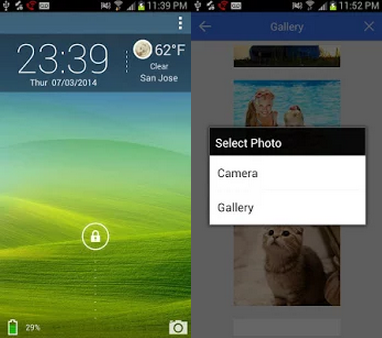
After installing Galaxy Photo Screen Lock, you can customize your lock screen in a number of different ways, including:
-Add date/time/weekday
-Add real-time weather forecast
-Add notification alerts for missed calls and unread messages
-Add camera shortcut
-Add flexible backgrounds and choose from 10+ pretty built-in backgrounds
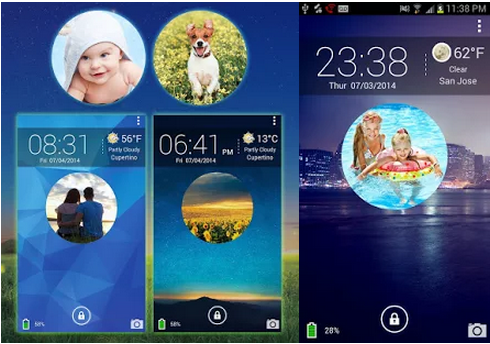
-Add photos and photo slideshows to your lockscreen
Obviously, many of these features are similar to the features you see on other Android lock screen apps. The main exception is the photo slideshow feature, which lets you add as many photos as you like to your device. The photos will cycle through one another on your lock screen and appear as a circle in the middle of the screen.
As the name suggest, the Galaxy Photo Screen Lock is designed for use on Galaxy devices. It has specifically been tested on the Galaxy S3, S4, and S5.
However, wangxing explains that the app will likely work on other devices and encourages users to download the app and try it out.
-Add date/time/weekday
-Add real-time weather forecast
-Add notification alerts for missed calls and unread messages
-Add camera shortcut
-Add flexible backgrounds and choose from 10+ pretty built-in backgrounds
-Add photos and photo slideshows to your lockscreen
Obviously, many of these features are similar to the features you see on other Android lock screen apps. The main exception is the photo slideshow feature, which lets you add as many photos as you like to your device. The photos will cycle through one another on your lock screen and appear as a circle in the middle of the screen.
As the name suggest, the Galaxy Photo Screen Lock is designed for use on Galaxy devices. It has specifically been tested on the Galaxy S3, S4, and S5.
However, wangxing explains that the app will likely work on other devices and encourages users to download the app and try it out.
Newsletter
Get the latest tech news delivered to your inbox weekly.