How it Works?
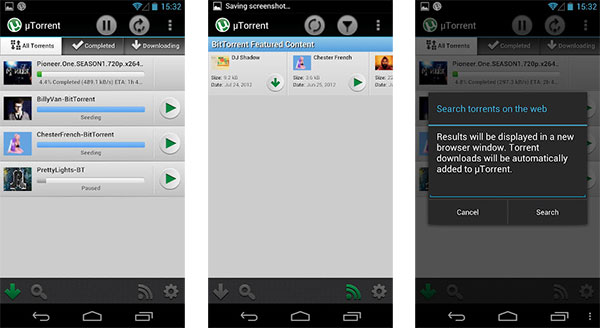
To get started, simply download the μTorrent Beta Android app from Google Play Store for free and install it on your device. You can now directly get started with your torrent downloads. The basic downloading feature works perfectly well without any compromise in downloading speed or malware encountered. Its smooth, sleek and user-friendly interface is perfectly designed to allow the user to easily navigate through while being easy on the eyes. Downloads can be started and stopped with simple one-touch access. Tapping the torrent file will display the “Pause” and “Remove the torrent” options. On the right part, you can check options like “Size”, “Number of files in torrent”, “Peers”, and “Date of Addition”. μTorrent Beta will constantly show you a download bar on your app homescreen of the torrent file that you are downloading to keep track of the progress of its download. This download progress is displayed as the download percentage completed along with its transfer rate and estimated time of completion. The app homescreen will also show you 3 tabs at the top which allows you to filter torrents by showing you all files that have finished downloading, currently being downloaded, or both.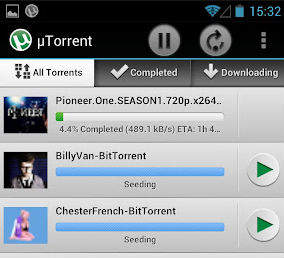 The μTorrent Beta client allows you to directly search for the torrent files you are looking for using the all-powerful Google search engine. Once you have chosen the torrent file you need, the torrent file will automatically be added to your μTorrent downloads. Unfortunately, there is no torrents-exclusive in-built search engine available that would help cut down the time taken to navigate to your required torrent files.
You can also directly add new torrents yourself by navigating to the panel of options available at the top right corner of the app homescreen. Tap the option with the “+” sign and then copy and paste the torrent file URL.
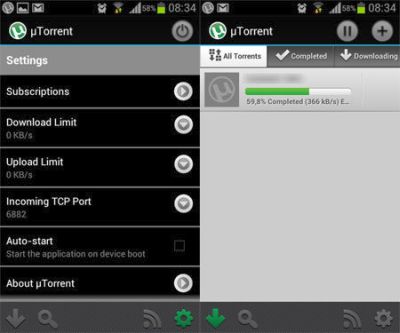
The μTorrent Beta client provides a great customizable settings panel which can be accessed from the left bottom part of the app homescreen. On tapping it, you can now access options which will allow you to configure your torrent download settings. You can now maximize or limit your torrent download and upload speeds, and set the μTorrent Beta app to auto-start whenever your Android device starts. You can also access the featured content of BitTorrent tapping the Subscriptions option at the top of your Settings menu. Using this, you can download featured torrents which can be refreshed from the Feeds menu, or even add more new subscriptions. The μTorrent Beta Android app can be turned off using the Power button available at the top right corner of your app homescreen to instantly suspend all torrent download and upload activity.
The μTorrent Beta client allows you to directly search for the torrent files you are looking for using the all-powerful Google search engine. Once you have chosen the torrent file you need, the torrent file will automatically be added to your μTorrent downloads. Unfortunately, there is no torrents-exclusive in-built search engine available that would help cut down the time taken to navigate to your required torrent files.
You can also directly add new torrents yourself by navigating to the panel of options available at the top right corner of the app homescreen. Tap the option with the “+” sign and then copy and paste the torrent file URL.
The μTorrent Beta client provides a great customizable settings panel which can be accessed from the left bottom part of the app homescreen. On tapping it, you can now access options which will allow you to configure your torrent download settings. You can now maximize or limit your torrent download and upload speeds, and set the μTorrent Beta app to auto-start whenever your Android device starts. You can also access the featured content of BitTorrent tapping the Subscriptions option at the top of your Settings menu. Using this, you can download featured torrents which can be refreshed from the Feeds menu, or even add more new subscriptions. The μTorrent Beta Android app can be turned off using the Power button available at the top right corner of your app homescreen to instantly suspend all torrent download and upload activity.