

 Here is a compiled list of problems sourced from user feedback you may experience using third party apps after the KitKat Update:
- File Manager app can no longer create, move or edit files or folders on external SD card
- Camera, Music or Video app can no longer save files to external sdcard or edit your media file saved on ecternal storage
- Previous paid or free app/game data saved on sdcard can no longer work or be accessed
- WiFi syncing to SD card is blocked
- Move apps to SD card is blocked
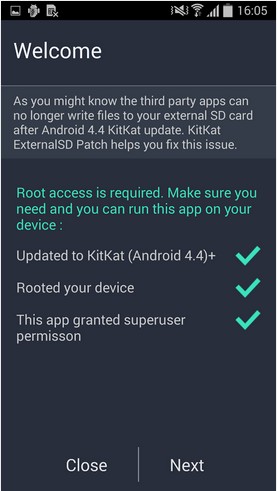
Thus, here is a free, simple, and ads-free app which helps you magically restore all your previous access to external SD card. Once this patch in installed on your phone, the third party apps can run normal as before.
Here is a compiled list of problems sourced from user feedback you may experience using third party apps after the KitKat Update:
- File Manager app can no longer create, move or edit files or folders on external SD card
- Camera, Music or Video app can no longer save files to external sdcard or edit your media file saved on ecternal storage
- Previous paid or free app/game data saved on sdcard can no longer work or be accessed
- WiFi syncing to SD card is blocked
- Move apps to SD card is blocked
Thus, here is a free, simple, and ads-free app which helps you magically restore all your previous access to external SD card. Once this patch in installed on your phone, the third party apps can run normal as before.
KitKat External SD Card Patch - If the Android Update Broke Your SD Card
3 min read
If you are one of those unfortunate people who very excitedly upgraded to Kitkat and had your SD card broken in the process, I feel you. Also, I have a solution to your problem in the form of an app. That app is called KitKat External SD Card Patch. Although its utility is reflected in a pretty straightforward way through its name, all you need to know is that it is essentially a patch for your broken SD card.
Users are in an uproar because they updated their phone to Android 4.4 KitKat, and now the SD card support has changed. Apps no longer work, folks have problems with cameras and music players and all this without any advance warning before they grabbed the update. So just like poison cures poison, technology cures technology as well. Therefore, Google has modified the default permissions for the external SD Card on Android 4.4 KitKat, which directly caused many of your favorite third parity apps lose read/write access to external SD card and became useless.
Here is a compiled list of problems sourced from user feedback you may experience using third party apps after the KitKat Update:
- File Manager app can no longer create, move or edit files or folders on external SD card
- Camera, Music or Video app can no longer save files to external sdcard or edit your media file saved on ecternal storage
- Previous paid or free app/game data saved on sdcard can no longer work or be accessed
- WiFi syncing to SD card is blocked
- Move apps to SD card is blocked
Thus, here is a free, simple, and ads-free app which helps you magically restore all your previous access to external SD card. Once this patch in installed on your phone, the third party apps can run normal as before.
Here is a compiled list of problems sourced from user feedback you may experience using third party apps after the KitKat Update:
- File Manager app can no longer create, move or edit files or folders on external SD card
- Camera, Music or Video app can no longer save files to external sdcard or edit your media file saved on ecternal storage
- Previous paid or free app/game data saved on sdcard can no longer work or be accessed
- WiFi syncing to SD card is blocked
- Move apps to SD card is blocked
Thus, here is a free, simple, and ads-free app which helps you magically restore all your previous access to external SD card. Once this patch in installed on your phone, the third party apps can run normal as before.
Newsletter
Get the latest tech news delivered to your inbox weekly.