

 NTFS Mounter works on the following devices:
- Samsung Galaxy S2
- Samsung Galaxy Note
- Samsung Galaxy Tab 2
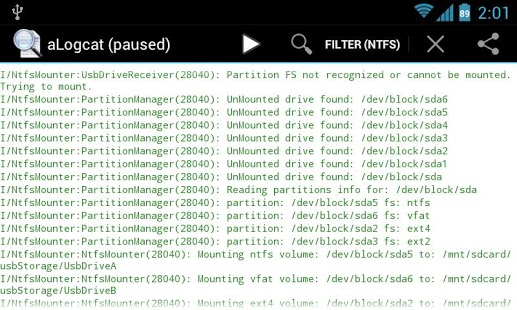
Once NTFS Mounter is installed and you connect a NTFS/EXT formated USB stick with the USB host / OTG cable, the application will mount your drive. Device partitions will be mounted to: /sdcard/usbStorage/UsbDriveA…UsbDriveF, SD Card will be mounted to: /mnt/sdcard/external_sd. You don't need to run the Ntfs Mounter each time, drive should be mounted automatically.
The best part is that this app has a new, 0.5, version with the following things:
- file systems support: NTFS, EXT2, EXT3, EXT4
- SD card support. The card is visible in all applications including standard android apps (camera, file manager,...).
- user applications can be installed into the NTFS, EXT2, EXT3 or EXT4 formatted card
- multi partitions support on USB drives
- full system integration - no more messages that card or USB drive is not formatted or blank
- standard android notifications are used instead of old Ntfs Mounter notifications
- USB drives are mounted into: /mnt/sdcard/usbStorage/UsbDriveA,.../mnt/sdcard/usbStorage/UsbDriveF
- some bugs are fixed
Now whenever you need easy mounting and dismounting of various things such as USB cables, NTFS Mounter will prove to be your go-to app!
NTFS Mounter works on the following devices:
- Samsung Galaxy S2
- Samsung Galaxy Note
- Samsung Galaxy Tab 2
Once NTFS Mounter is installed and you connect a NTFS/EXT formated USB stick with the USB host / OTG cable, the application will mount your drive. Device partitions will be mounted to: /sdcard/usbStorage/UsbDriveA…UsbDriveF, SD Card will be mounted to: /mnt/sdcard/external_sd. You don't need to run the Ntfs Mounter each time, drive should be mounted automatically.
The best part is that this app has a new, 0.5, version with the following things:
- file systems support: NTFS, EXT2, EXT3, EXT4
- SD card support. The card is visible in all applications including standard android apps (camera, file manager,...).
- user applications can be installed into the NTFS, EXT2, EXT3 or EXT4 formatted card
- multi partitions support on USB drives
- full system integration - no more messages that card or USB drive is not formatted or blank
- standard android notifications are used instead of old Ntfs Mounter notifications
- USB drives are mounted into: /mnt/sdcard/usbStorage/UsbDriveA,.../mnt/sdcard/usbStorage/UsbDriveF
- some bugs are fixed
Now whenever you need easy mounting and dismounting of various things such as USB cables, NTFS Mounter will prove to be your go-to app!
NTFS Mounter - Easy Mounting and Dismounting
3 min read
Before going ahead with discussing today’s app, let us discuss a bit about NTFS. NTFS, or New Technology File System, is the primary Windows file system, starting with Windows NT. NTFS is required to implement various security and administrative features in Windows. For example, NTFS supports Active Directory domain names and provides file encryption. Permissions can be set at the file level rather than by folder, and individual users can be assigned disk space quotas.
NTFS is a journaling file system that can recover from disk errors more readily than the earlier FAT32 file system. It also supports the Unicode character set and long file names (up to 255 characters).
Also, a lot of times Ntfs is confused with FAT when, in fact, they are two completely different things. FAT stands for File Allocation Table and FAT32 is an extension which means that data is stored in chunks of 32 bits. These is an older type of file system that isn’t commonly used these days. NTFS took over from FAT as the primary file system being used in Windows.
NTFS maintains a log of disk changes and in case of power failure or abrupt errors it repairs the files and folders automatically without the user being notified anything. FAT32 maintains two different copies of the file allocation table and uses a back up mechanism if some damage occurs. In FAT32 you will have to depend on share permissions for security. This means that they are good in the Network but locally they are vulnerable. On the other hand NTFS allows you to set permissions on local files and folders as well.
Now that we know a little more about Ntfs, we will be able to understand the requirement of today’s app better which is NTFS Mounter. This app helps us to automatically mount and dismount NTFS/FAT/EXT2/EXT3/EXT4 formatted USB Sticks, USB HDD, SD Cards if we have a rooted android device.
NTFS Mounter works on the following devices:
- Samsung Galaxy S2
- Samsung Galaxy Note
- Samsung Galaxy Tab 2
Once NTFS Mounter is installed and you connect a NTFS/EXT formated USB stick with the USB host / OTG cable, the application will mount your drive. Device partitions will be mounted to: /sdcard/usbStorage/UsbDriveA…UsbDriveF, SD Card will be mounted to: /mnt/sdcard/external_sd. You don't need to run the Ntfs Mounter each time, drive should be mounted automatically.
The best part is that this app has a new, 0.5, version with the following things:
- file systems support: NTFS, EXT2, EXT3, EXT4
- SD card support. The card is visible in all applications including standard android apps (camera, file manager,...).
- user applications can be installed into the NTFS, EXT2, EXT3 or EXT4 formatted card
- multi partitions support on USB drives
- full system integration - no more messages that card or USB drive is not formatted or blank
- standard android notifications are used instead of old Ntfs Mounter notifications
- USB drives are mounted into: /mnt/sdcard/usbStorage/UsbDriveA,.../mnt/sdcard/usbStorage/UsbDriveF
- some bugs are fixed
Now whenever you need easy mounting and dismounting of various things such as USB cables, NTFS Mounter will prove to be your go-to app!
NTFS Mounter works on the following devices:
- Samsung Galaxy S2
- Samsung Galaxy Note
- Samsung Galaxy Tab 2
Once NTFS Mounter is installed and you connect a NTFS/EXT formated USB stick with the USB host / OTG cable, the application will mount your drive. Device partitions will be mounted to: /sdcard/usbStorage/UsbDriveA…UsbDriveF, SD Card will be mounted to: /mnt/sdcard/external_sd. You don't need to run the Ntfs Mounter each time, drive should be mounted automatically.
The best part is that this app has a new, 0.5, version with the following things:
- file systems support: NTFS, EXT2, EXT3, EXT4
- SD card support. The card is visible in all applications including standard android apps (camera, file manager,...).
- user applications can be installed into the NTFS, EXT2, EXT3 or EXT4 formatted card
- multi partitions support on USB drives
- full system integration - no more messages that card or USB drive is not formatted or blank
- standard android notifications are used instead of old Ntfs Mounter notifications
- USB drives are mounted into: /mnt/sdcard/usbStorage/UsbDriveA,.../mnt/sdcard/usbStorage/UsbDriveF
- some bugs are fixed
Now whenever you need easy mounting and dismounting of various things such as USB cables, NTFS Mounter will prove to be your go-to app!
Newsletter
Get the latest tech news delivered to your inbox weekly.