

 Yes, this app is one of those rare ones that is supported by both rooted and unrooted devices because sharing is caring. However, there are a few things that you would need to keep in mind whether your device is rooted or unrooted:
- Make sure you app is granted by SuperUser
- If you cannot freeze/defrost, try to enable USB Debugging (HOME/Settings/Application/Development/USB Debugging)
- If you cannot restore backup app, try to "find apps on SD card" then long-press the app and select "install as system app".
- This application uses SDCARD to store data
- PRO and FREE version are fully compatible
Even though the android community is sub-divided into two categories, we need to keep the bigger picture in mind and understand that we all belong to the android community. Thus, Root Uninstaller Pro proves to be the common ground for the rooted and the unrooted.
Yes, this app is one of those rare ones that is supported by both rooted and unrooted devices because sharing is caring. However, there are a few things that you would need to keep in mind whether your device is rooted or unrooted:
- Make sure you app is granted by SuperUser
- If you cannot freeze/defrost, try to enable USB Debugging (HOME/Settings/Application/Development/USB Debugging)
- If you cannot restore backup app, try to "find apps on SD card" then long-press the app and select "install as system app".
- This application uses SDCARD to store data
- PRO and FREE version are fully compatible
Even though the android community is sub-divided into two categories, we need to keep the bigger picture in mind and understand that we all belong to the android community. Thus, Root Uninstaller Pro proves to be the common ground for the rooted and the unrooted.
Root Uninstaller Pro - For the Rooted and the Unrooted
3 min read
It must have come to your notice by now that the world of android is increasingly being divided into the rooted and the unrooted. There is a rooted community and the unrooted community. It is like a tribal living system where two tribes do interact with each other and share advice and pass pointers but never mingle. They have their separate fields where each community works, produces food and eats it.
From the jungle to the river, everything is divided between the communities and their lives do not cross each other too much. Their resources are strictly theirs and they prefer to remain this way.
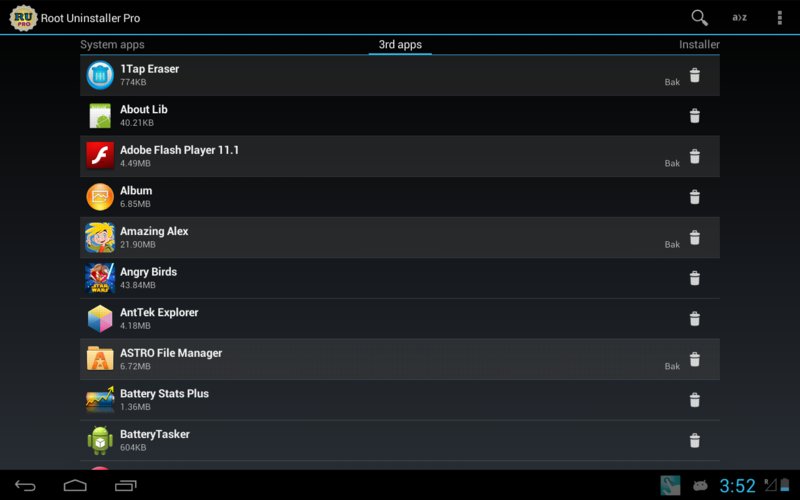
Thankfully, there is someone or something to bridge this gap between the rooted and the unrooted and that is an app called Root Uninstaller Pro. This application can freeze pre-installed applications on your phone and more. It is a very fast and simple uninstaller tool that works on a single click for uninstalling both SYSTEM and REGULAR applications.
For ROOT+NAND unlocked devices
- Uninstall system applications
- Freeze or disable bloatware, stock and regular applications (keep updates)
- Defrost or enable applications (Free trial or PRO)
- Backup system application .apk to sdcard (that can reinstall later)
- Restore backed up applications
- Reset applications to fresh install state
- Delete definitively system applications
- Hide my App: launch a frozen app and automatically re-freeze on app closing (Pro only, tap on Launch->Freeze button )
- Explore application data folder, code folder (ex. edit preferences, need AntTek File Explorer)
For NON-ROOT devices
- Quick APK list to show all available .APK files on SDCard
- Keep Market reference and can restore after factory reset/change devices
- Manage to clear data, cache (manually)
- Manage .apk files: delete, install, install as a system app (PRO)
- Single click to uninstall a listed applications (Batch uninstall).
- Rapid load application list
- Display application name, icon, package name
- Exclude system applications (that you can not uninstall)
- Filter by third-party applications, system applications, applications on sdcard. backup applications or frozen applications
- Support large screen (ex. tablet) views
- Explore application data folder, code folder (ex. edit preferences, need AntTek File Explorer)
Yes, this app is one of those rare ones that is supported by both rooted and unrooted devices because sharing is caring. However, there are a few things that you would need to keep in mind whether your device is rooted or unrooted:
- Make sure you app is granted by SuperUser
- If you cannot freeze/defrost, try to enable USB Debugging (HOME/Settings/Application/Development/USB Debugging)
- If you cannot restore backup app, try to "find apps on SD card" then long-press the app and select "install as system app".
- This application uses SDCARD to store data
- PRO and FREE version are fully compatible
Even though the android community is sub-divided into two categories, we need to keep the bigger picture in mind and understand that we all belong to the android community. Thus, Root Uninstaller Pro proves to be the common ground for the rooted and the unrooted.
Yes, this app is one of those rare ones that is supported by both rooted and unrooted devices because sharing is caring. However, there are a few things that you would need to keep in mind whether your device is rooted or unrooted:
- Make sure you app is granted by SuperUser
- If you cannot freeze/defrost, try to enable USB Debugging (HOME/Settings/Application/Development/USB Debugging)
- If you cannot restore backup app, try to "find apps on SD card" then long-press the app and select "install as system app".
- This application uses SDCARD to store data
- PRO and FREE version are fully compatible
Even though the android community is sub-divided into two categories, we need to keep the bigger picture in mind and understand that we all belong to the android community. Thus, Root Uninstaller Pro proves to be the common ground for the rooted and the unrooted.
Newsletter
Get the latest tech news delivered to your inbox weekly.