

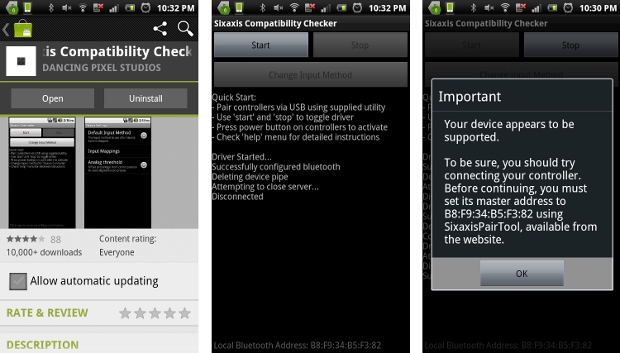
 A few things to keep in mind with Sixaxis Controller are:
- Root access is required.
- Due to the way pairing is done with the controllers, you need to manually pair your controller with the PC utility 'SixaxisPairTool' (available on the website) and a mini-USB cable. Android 3.1+ users can also pair directly on their devices via USB.
- It is highly recommended that you use an ORIGINAL controller. Many after market controllers will not work with this app. If you get a 'Client connected: 1' message, but the lights on your controller continue to flash, it is almost certainly not an original Sony controller.
- The fake controllers that are most likely to work (though not guaranteed) are those made by Gasia. If you bought a fake that works but isn't made by Gasia, I'd love to hear from you so I can compile a list of known working controllers.
- Be sure to read the instructions in the help menu carefully.
Note that not all devices are supported, therefore it is strongly recommended that you try the Sixaxis Compatibility Checker (available for free on Google Play) before purchasing this app.
There are a number of amazing features supported by Sixaxis Controller, including:
- Up to four Sixaxis, DualShock 3, DualShock 4 and Navigation controllers supported at once.
- Support as a native gamepad in Android 3.1+ devices. Full support for analog sticks and analog triggers.
- Keyboard emulation. Map all buttons and sticks to almost any key available in Android.
- Mouse emulation. Configure a button to activate the mouse pointer on devices that support mice (most tablets, and many phones should work).
- Touch emulation allows you to map buttons and analog sticks to the screen. Play all your favourite games with full analog support, even those without built-in controller support.
So now you do not have to compromise in any way with the quality of your gaming experience. Sixaxis Controller will make sure that your smartphone gaming experience is like the real deal!
A few things to keep in mind with Sixaxis Controller are:
- Root access is required.
- Due to the way pairing is done with the controllers, you need to manually pair your controller with the PC utility 'SixaxisPairTool' (available on the website) and a mini-USB cable. Android 3.1+ users can also pair directly on their devices via USB.
- It is highly recommended that you use an ORIGINAL controller. Many after market controllers will not work with this app. If you get a 'Client connected: 1' message, but the lights on your controller continue to flash, it is almost certainly not an original Sony controller.
- The fake controllers that are most likely to work (though not guaranteed) are those made by Gasia. If you bought a fake that works but isn't made by Gasia, I'd love to hear from you so I can compile a list of known working controllers.
- Be sure to read the instructions in the help menu carefully.
Note that not all devices are supported, therefore it is strongly recommended that you try the Sixaxis Compatibility Checker (available for free on Google Play) before purchasing this app.
There are a number of amazing features supported by Sixaxis Controller, including:
- Up to four Sixaxis, DualShock 3, DualShock 4 and Navigation controllers supported at once.
- Support as a native gamepad in Android 3.1+ devices. Full support for analog sticks and analog triggers.
- Keyboard emulation. Map all buttons and sticks to almost any key available in Android.
- Mouse emulation. Configure a button to activate the mouse pointer on devices that support mice (most tablets, and many phones should work).
- Touch emulation allows you to map buttons and analog sticks to the screen. Play all your favourite games with full analog support, even those without built-in controller support.
So now you do not have to compromise in any way with the quality of your gaming experience. Sixaxis Controller will make sure that your smartphone gaming experience is like the real deal!
Sixaxis Controller - The Ultimate Smartphone Gaming Experience
3 min read
Rooting makes the world of android a better place to live in, with more freedom, more control, an enhanced performance, unlimited space and lightening speed. It opens doors to many new and exclusive apps and a better functioning of regular apps. Rooting makes the smartphone gaming experience better than an unrooted android device. But if you download the right apps, rooting could make this gaming experience not just better but the best.
Even though there have been a lot of advancements and enhancements in the rooted android gaming department, yet there is nothing like holding the controller of the Play Station. Well, like I said, all one needs to do is know the right app. Therefore today’s app is Sixaxis Controller. This app will give you the ultimate gaming experience. Now you can play games on your phone the way they were meant to be played. Sixaxis Controller allows you to use the following controllers in many of your favourite games and applications:
PlayStation 3:
Sixaxis Controller
DualShock 3 Wireless Controller
PlayStation Move Navigation Controller
PlayStation 4:
DualShock 4 Wireless Controller (If pairing on a PC, you must use SixaxisPairTool 0.3.0+)
A few things to keep in mind with Sixaxis Controller are:
- Root access is required.
- Due to the way pairing is done with the controllers, you need to manually pair your controller with the PC utility 'SixaxisPairTool' (available on the website) and a mini-USB cable. Android 3.1+ users can also pair directly on their devices via USB.
- It is highly recommended that you use an ORIGINAL controller. Many after market controllers will not work with this app. If you get a 'Client connected: 1' message, but the lights on your controller continue to flash, it is almost certainly not an original Sony controller.
- The fake controllers that are most likely to work (though not guaranteed) are those made by Gasia. If you bought a fake that works but isn't made by Gasia, I'd love to hear from you so I can compile a list of known working controllers.
- Be sure to read the instructions in the help menu carefully.
Note that not all devices are supported, therefore it is strongly recommended that you try the Sixaxis Compatibility Checker (available for free on Google Play) before purchasing this app.
There are a number of amazing features supported by Sixaxis Controller, including:
- Up to four Sixaxis, DualShock 3, DualShock 4 and Navigation controllers supported at once.
- Support as a native gamepad in Android 3.1+ devices. Full support for analog sticks and analog triggers.
- Keyboard emulation. Map all buttons and sticks to almost any key available in Android.
- Mouse emulation. Configure a button to activate the mouse pointer on devices that support mice (most tablets, and many phones should work).
- Touch emulation allows you to map buttons and analog sticks to the screen. Play all your favourite games with full analog support, even those without built-in controller support.
So now you do not have to compromise in any way with the quality of your gaming experience. Sixaxis Controller will make sure that your smartphone gaming experience is like the real deal!
A few things to keep in mind with Sixaxis Controller are:
- Root access is required.
- Due to the way pairing is done with the controllers, you need to manually pair your controller with the PC utility 'SixaxisPairTool' (available on the website) and a mini-USB cable. Android 3.1+ users can also pair directly on their devices via USB.
- It is highly recommended that you use an ORIGINAL controller. Many after market controllers will not work with this app. If you get a 'Client connected: 1' message, but the lights on your controller continue to flash, it is almost certainly not an original Sony controller.
- The fake controllers that are most likely to work (though not guaranteed) are those made by Gasia. If you bought a fake that works but isn't made by Gasia, I'd love to hear from you so I can compile a list of known working controllers.
- Be sure to read the instructions in the help menu carefully.
Note that not all devices are supported, therefore it is strongly recommended that you try the Sixaxis Compatibility Checker (available for free on Google Play) before purchasing this app.
There are a number of amazing features supported by Sixaxis Controller, including:
- Up to four Sixaxis, DualShock 3, DualShock 4 and Navigation controllers supported at once.
- Support as a native gamepad in Android 3.1+ devices. Full support for analog sticks and analog triggers.
- Keyboard emulation. Map all buttons and sticks to almost any key available in Android.
- Mouse emulation. Configure a button to activate the mouse pointer on devices that support mice (most tablets, and many phones should work).
- Touch emulation allows you to map buttons and analog sticks to the screen. Play all your favourite games with full analog support, even those without built-in controller support.
So now you do not have to compromise in any way with the quality of your gaming experience. Sixaxis Controller will make sure that your smartphone gaming experience is like the real deal!
Newsletter
Get the latest tech news delivered to your inbox weekly.