

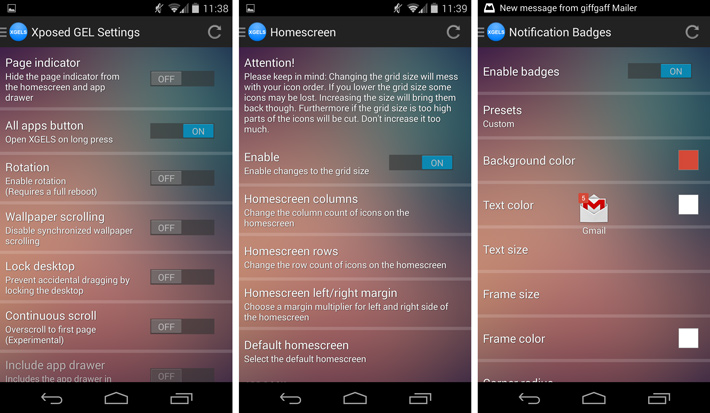
 It also supports notification badges in its premium version.
Not just this, it has gesture control:
- swipe down left, middle, right
- swipe up left, middle, right
- Gesture actions
- pull down notification bar
- pull down quick settings panel
- open app drawer
- open last app from recents
- open android settings
- go to sleep
- toggle hide/show app dock
- launch an app
There is more! You can also change the grid at the following places:
- homescreen
- app drawer
- app dock
- homescreen margins
Xposed Gel Settings includes the customisation of the app drawer background, folder colors and text colours on home screen app drawer. with it you may resize icons, icon texts and hide shadows.
The system UI includes:
- hide clock on default homescreen
- open the app drawer when pressing the home button on default homescreen
- change the icon of the home button to an app drawer icon on default homescreen
- go to sleep when pressing back button on every screen or only on default homescreen
- change the icon of the back button to a power off button
Not just this, it has a number of miscellaneous features, including:
- rotate launcher
- all widgets are fully resizeable
- set your own default homescreen
- lock desktop
- continuous scroll (experimental)
- overscroll left or right to open the app drawer
- overscroll in app drawer goes back to homescreen
- close app drawer after launching an app
- disable wallpaper scrolling
So this is an app the under promises but definitely over delivers. There is more to life than Google, a thing called having some space. Xposed Gel Settings makes sure that you get as much space as you need!
It also supports notification badges in its premium version.
Not just this, it has gesture control:
- swipe down left, middle, right
- swipe up left, middle, right
- Gesture actions
- pull down notification bar
- pull down quick settings panel
- open app drawer
- open last app from recents
- open android settings
- go to sleep
- toggle hide/show app dock
- launch an app
There is more! You can also change the grid at the following places:
- homescreen
- app drawer
- app dock
- homescreen margins
Xposed Gel Settings includes the customisation of the app drawer background, folder colors and text colours on home screen app drawer. with it you may resize icons, icon texts and hide shadows.
The system UI includes:
- hide clock on default homescreen
- open the app drawer when pressing the home button on default homescreen
- change the icon of the home button to an app drawer icon on default homescreen
- go to sleep when pressing back button on every screen or only on default homescreen
- change the icon of the back button to a power off button
Not just this, it has a number of miscellaneous features, including:
- rotate launcher
- all widgets are fully resizeable
- set your own default homescreen
- lock desktop
- continuous scroll (experimental)
- overscroll left or right to open the app drawer
- overscroll in app drawer goes back to homescreen
- close app drawer after launching an app
- disable wallpaper scrolling
So this is an app the under promises but definitely over delivers. There is more to life than Google, a thing called having some space. Xposed Gel Settings makes sure that you get as much space as you need!
Xposed Gel Settings - When Google Gets On Your Nerves
3 min read
Yes, I dared to say it. I love Google as much as the whole world does but its omnipresence could be a little too much at time. Yes, it is the most helpful thing on earth which plays a number of roles like a guide, a teacher, a friend, a lover, a mentor, an entertainer, and much more. But the way it has taken over our lives is no joke. Sometimes, some of us might want to take a break form it because whatever gadget one picks up, Google is the first thing that appears.
As the saying goes, too much of even a good thing is bad, therefore, Xposed Gel Settings is at your service, if you have a rooted android device. Therefore, if you are a bit sick of the Google search bar making its way on every home page despite the fact that there is Google in the launcher if one goes to the left page, this is the app that will help you breathe a little.
The things that Xposed Gel Settings can hide are:
- Google search bar / automatically show search bar on Google Now
- apps from the app drawer
- widgets
- page indicator
- app dock / auto hide
- all apps button
- icon labels
It also has an icon pack in its Premium Version which includes the following features:
- supports any icon pack
- automatically applies new icon packs
- dynamic calendar icon (free: un-themed, paid: themed by icon pack)
It also supports notification badges in its premium version.
Not just this, it has gesture control:
- swipe down left, middle, right
- swipe up left, middle, right
- Gesture actions
- pull down notification bar
- pull down quick settings panel
- open app drawer
- open last app from recents
- open android settings
- go to sleep
- toggle hide/show app dock
- launch an app
There is more! You can also change the grid at the following places:
- homescreen
- app drawer
- app dock
- homescreen margins
Xposed Gel Settings includes the customisation of the app drawer background, folder colors and text colours on home screen app drawer. with it you may resize icons, icon texts and hide shadows.
The system UI includes:
- hide clock on default homescreen
- open the app drawer when pressing the home button on default homescreen
- change the icon of the home button to an app drawer icon on default homescreen
- go to sleep when pressing back button on every screen or only on default homescreen
- change the icon of the back button to a power off button
Not just this, it has a number of miscellaneous features, including:
- rotate launcher
- all widgets are fully resizeable
- set your own default homescreen
- lock desktop
- continuous scroll (experimental)
- overscroll left or right to open the app drawer
- overscroll in app drawer goes back to homescreen
- close app drawer after launching an app
- disable wallpaper scrolling
So this is an app the under promises but definitely over delivers. There is more to life than Google, a thing called having some space. Xposed Gel Settings makes sure that you get as much space as you need!
It also supports notification badges in its premium version.
Not just this, it has gesture control:
- swipe down left, middle, right
- swipe up left, middle, right
- Gesture actions
- pull down notification bar
- pull down quick settings panel
- open app drawer
- open last app from recents
- open android settings
- go to sleep
- toggle hide/show app dock
- launch an app
There is more! You can also change the grid at the following places:
- homescreen
- app drawer
- app dock
- homescreen margins
Xposed Gel Settings includes the customisation of the app drawer background, folder colors and text colours on home screen app drawer. with it you may resize icons, icon texts and hide shadows.
The system UI includes:
- hide clock on default homescreen
- open the app drawer when pressing the home button on default homescreen
- change the icon of the home button to an app drawer icon on default homescreen
- go to sleep when pressing back button on every screen or only on default homescreen
- change the icon of the back button to a power off button
Not just this, it has a number of miscellaneous features, including:
- rotate launcher
- all widgets are fully resizeable
- set your own default homescreen
- lock desktop
- continuous scroll (experimental)
- overscroll left or right to open the app drawer
- overscroll in app drawer goes back to homescreen
- close app drawer after launching an app
- disable wallpaper scrolling
So this is an app the under promises but definitely over delivers. There is more to life than Google, a thing called having some space. Xposed Gel Settings makes sure that you get as much space as you need!
Newsletter
Get the latest tech news delivered to your inbox weekly.