

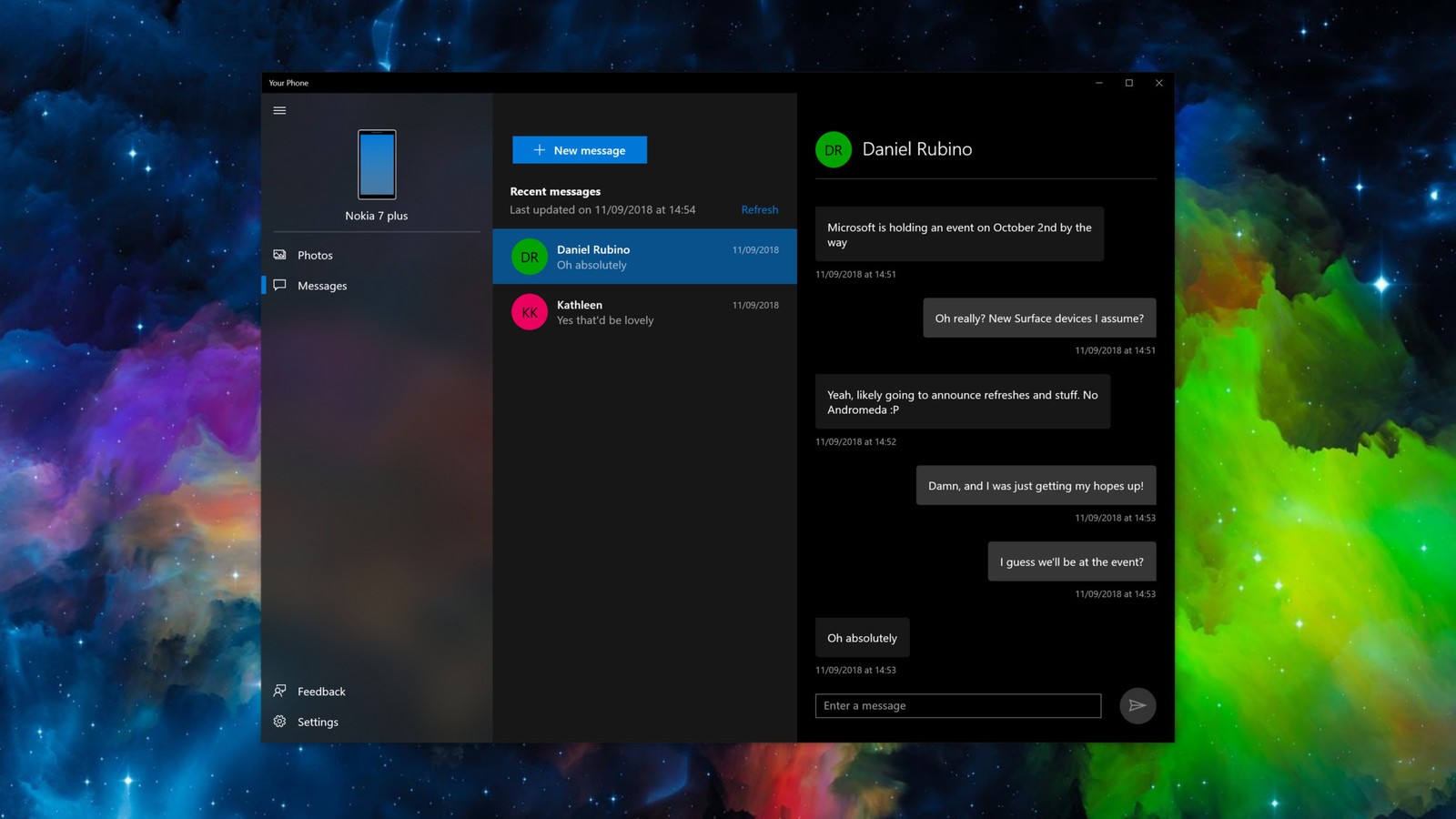
Windows 10's new 'Your Phone' Android SMS syncs messages from your phone to PC
3 min read
It’s not perfect, but it’s got lots of potentials. The new Windows 10 app “Your Phone” allows one to send, receive, and read SMS conversations on your phone from your PC.
We have several messaging apps like WeChat, Facebook Messenger, Viber, and the likes, but this might be the first time we can actually sync messages from a SIM Card and even text using your sim number via your PC. The app can also sync other files from your phone such as photos.
Preview Testing
The “Your Phone” app is still at its testing phase and not yet available to the public. Few people were invited to test the program live and they have mixed first impressions. At first glance, they were immediately hooked to the user interface. Basically, it has three columns: the first shows the general info, settings, menu, etc.; the second shows the contacts or list of conversations, and the third column shows the conversation of the selected contact.
This can help us save time doing multi-tasking. And by that, I mean picking up your phone to answer a text while you’re busy working. With this new PC app, you can just easily switch windows using the shortcut ALT+TAB and text away.
The app can sync all SMS conversations from whatever SMS app you’re using on your Android. It could either be from the default Android messaging app or messaging app from third-party launchers. The same goes for your Contacts. In short, it will not require you to install additional apps on your phone just to sync information to your PC.
Lots of work to do
The review was a fifty-fifty success due to the noticeable problems. The actual syncing could still use some work according to them. The first seconds of syncing information work fine but it will soon slow down. Sometimes it won’t display all the conversations from your phone and you have to hit manual refresh to resync.
The synchronization process is not actually real-time. Plus, once you transfer to another PC app, “Your Phone” stops sending notifications when you receive new messages which make the notification feature useless.
The pop-up notification also lacks several features such as the disability to reply directly from it. Once you see the notification, you have to visit the app’s window to reply when it could’ve been easier to reply via the pop-up notification. Additionally, there’s a delay time when sending via the “Your Phone” app.
Rolling out soon
As I said, it’s not perfect but pretty exciting. Besides, Microsoft has plenty of time on their hands to fix the aforementioned issues. Just focus on one thing Microsoft, just make it faster to make it actually useful.
The new “Your Phone” app is expected to roll out to the public as early as October. It will come along the October update so you better keep that “auto-update” setting enabled. For now, the app only works with Android Phones because Apple refused to allow third-party apps to access data from SMS conversations. You know, privacy issues. So, all hail Android!
Newsletter
Get the latest tech news delivered to your inbox weekly.