

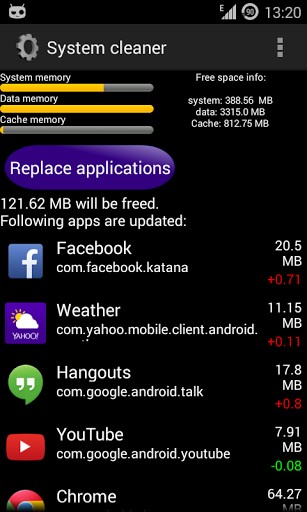
 It is highly recommended to make a nandroid backup before changing system files. Updating system applications decreases phone internal memory, because the update is stored in /data/app and the original apk is still in /system/app. Therefore, System Cleaner will automatically:
- Create a backup of the original apps in /sdcard/system cleaner/ (in case you want to restore the original apk)
- Delete the apk in /system/app
- Move the updated apk to /system/app
- Clear the dalvik-cache and application cache (optional)
- Reboot device (optional but recommended)
By doing this, a considerable amount of internal memory storage will be freed. This is very important if you have an older device with limited internal memory, so you can have updated apps and enough storage for new installs.
Here is how to operate System Cleaner:
- Start the application
- Let System Cleaner check for updated apps
- Start and let System cleaner finish the work
- Restart the device (preferable with deleting the dalvik-cache to free some more space if possible)
You will never face the problem of your phone getting cluttered. As they say, with great freedom comes great responsibility. Thus, System Cleaner is your friendly, responsible app that will make sure that nothing hampers your freedom to use your rooted device. It will make sure that your rooted android smartphone is functioning as well and as fats as it was when you has just rooted your device. It will make sure that you always have the liberty to download whatever you want, whenever you want!
It is highly recommended to make a nandroid backup before changing system files. Updating system applications decreases phone internal memory, because the update is stored in /data/app and the original apk is still in /system/app. Therefore, System Cleaner will automatically:
- Create a backup of the original apps in /sdcard/system cleaner/ (in case you want to restore the original apk)
- Delete the apk in /system/app
- Move the updated apk to /system/app
- Clear the dalvik-cache and application cache (optional)
- Reboot device (optional but recommended)
By doing this, a considerable amount of internal memory storage will be freed. This is very important if you have an older device with limited internal memory, so you can have updated apps and enough storage for new installs.
Here is how to operate System Cleaner:
- Start the application
- Let System Cleaner check for updated apps
- Start and let System cleaner finish the work
- Restart the device (preferable with deleting the dalvik-cache to free some more space if possible)
You will never face the problem of your phone getting cluttered. As they say, with great freedom comes great responsibility. Thus, System Cleaner is your friendly, responsible app that will make sure that nothing hampers your freedom to use your rooted device. It will make sure that your rooted android smartphone is functioning as well and as fats as it was when you has just rooted your device. It will make sure that you always have the liberty to download whatever you want, whenever you want!
How to Clean the Clutter From Your Android Device
3 min read
Rooting leads to a lot of good things. Apart from an enhanced performance, one of the coolest things about rooting is the fact that it gives us access to a plethora of fabulous apps that we can use. It is like being in an exclusive club, only, it is much better. Not only are the apps convenient but they also provide a lot of entertainment. And since rooting leads to the creation of a lot of spare space which we were not used to prior to rooting, we have a tendency to get carried away and download anything and everything that our hearts desire.
This does not affect the phone much when our rooting is brand new, but as time goes by, it creates a lot of clutter and since clutter and cleanliness are ironic synonyms (remember your room and your mother when you were in high school?), the natural thing would be to clean the clutter.
This leads us to System Cleaner because it is good to be clean. Not only does it clean the system, the system, in turn, starts performing faster. System cleaner can clear application cache and dalvik cache to free even more space. After the integration of new apps, if all is working OK, delete the backup file to free the storage (on newer devices, without the external SD card, the backup will occupy the internal storage space, and there will be the effect that the cleaner has not done its job well).
It is highly recommended to make a nandroid backup before changing system files. Updating system applications decreases phone internal memory, because the update is stored in /data/app and the original apk is still in /system/app. Therefore, System Cleaner will automatically:
- Create a backup of the original apps in /sdcard/system cleaner/ (in case you want to restore the original apk)
- Delete the apk in /system/app
- Move the updated apk to /system/app
- Clear the dalvik-cache and application cache (optional)
- Reboot device (optional but recommended)
By doing this, a considerable amount of internal memory storage will be freed. This is very important if you have an older device with limited internal memory, so you can have updated apps and enough storage for new installs.
Here is how to operate System Cleaner:
- Start the application
- Let System Cleaner check for updated apps
- Start and let System cleaner finish the work
- Restart the device (preferable with deleting the dalvik-cache to free some more space if possible)
You will never face the problem of your phone getting cluttered. As they say, with great freedom comes great responsibility. Thus, System Cleaner is your friendly, responsible app that will make sure that nothing hampers your freedom to use your rooted device. It will make sure that your rooted android smartphone is functioning as well and as fats as it was when you has just rooted your device. It will make sure that you always have the liberty to download whatever you want, whenever you want!
It is highly recommended to make a nandroid backup before changing system files. Updating system applications decreases phone internal memory, because the update is stored in /data/app and the original apk is still in /system/app. Therefore, System Cleaner will automatically:
- Create a backup of the original apps in /sdcard/system cleaner/ (in case you want to restore the original apk)
- Delete the apk in /system/app
- Move the updated apk to /system/app
- Clear the dalvik-cache and application cache (optional)
- Reboot device (optional but recommended)
By doing this, a considerable amount of internal memory storage will be freed. This is very important if you have an older device with limited internal memory, so you can have updated apps and enough storage for new installs.
Here is how to operate System Cleaner:
- Start the application
- Let System Cleaner check for updated apps
- Start and let System cleaner finish the work
- Restart the device (preferable with deleting the dalvik-cache to free some more space if possible)
You will never face the problem of your phone getting cluttered. As they say, with great freedom comes great responsibility. Thus, System Cleaner is your friendly, responsible app that will make sure that nothing hampers your freedom to use your rooted device. It will make sure that your rooted android smartphone is functioning as well and as fats as it was when you has just rooted your device. It will make sure that you always have the liberty to download whatever you want, whenever you want!
Newsletter
Get the latest tech news delivered to your inbox weekly.