

 There are a few things, however, that yo unwed to keep in mind before using this app - due to limitation of Android phone (hardware and software), this program only can record from microphone. Please turn on the loudspeaker during your conversations make sure that the recorded voice is loud and clear. All conversations are recorded under file “RecordMyCall” file in memory card.
Also, the permissions that you require to use Android Call Recorder are:
Read Phone Status: Detect incoming + outgoing call
Record Audio: Record call
Read Contacts: Filtering contact (which recorded or not) + Renaming file based on contact name
Read / Write Storage: Store recording files on USB storage or SD-card
Google Account: Upload recordings to Google Drive for backup
Internet Connection: Upload recordings to Google Drive + Dropbox for backup
Bluetooth: Different action if phone connected to Bluetooth
Prevent From Sleeping: Prevent fail recording for long call
Change Audio Setting: Turn on loudspeaker by option
So whether or not you have rooted your android device, if it does not have a call recording function and you really want to be able to enjoy recording calls effortlessly for professional or personal reasons, Android Call Recorder is a good option.
There are a few things, however, that yo unwed to keep in mind before using this app - due to limitation of Android phone (hardware and software), this program only can record from microphone. Please turn on the loudspeaker during your conversations make sure that the recorded voice is loud and clear. All conversations are recorded under file “RecordMyCall” file in memory card.
Also, the permissions that you require to use Android Call Recorder are:
Read Phone Status: Detect incoming + outgoing call
Record Audio: Record call
Read Contacts: Filtering contact (which recorded or not) + Renaming file based on contact name
Read / Write Storage: Store recording files on USB storage or SD-card
Google Account: Upload recordings to Google Drive for backup
Internet Connection: Upload recordings to Google Drive + Dropbox for backup
Bluetooth: Different action if phone connected to Bluetooth
Prevent From Sleeping: Prevent fail recording for long call
Change Audio Setting: Turn on loudspeaker by option
So whether or not you have rooted your android device, if it does not have a call recording function and you really want to be able to enjoy recording calls effortlessly for professional or personal reasons, Android Call Recorder is a good option.

RMC Android Call Recorder - Making Memories Out of Conversations
3 min read
If you own a fabulous Android phone, which has everything but a built-in call recorder (nothing is perfect), we have just the app for you. So for all you journalists and forgetful folks who really need to recall moments from your long conversations, you have an app to help you out. Today’s app in spotlight, called RMC : Android Call Recorder, is one that can record both your incoming and outgoing calls. So whether you want it for a whim of becoming a detective or actually have a purpose to record your calls, maybe you are just like recording calls for memories, you have an app to help you out.
Some of the top Android Call Recorder’s features include:
-Record all incoming and outgoing call automatic and manual mode
-Movable manual record button
-Support two folders to keep the recordings (unsorted and important)
-Advance search with many option to find recordings
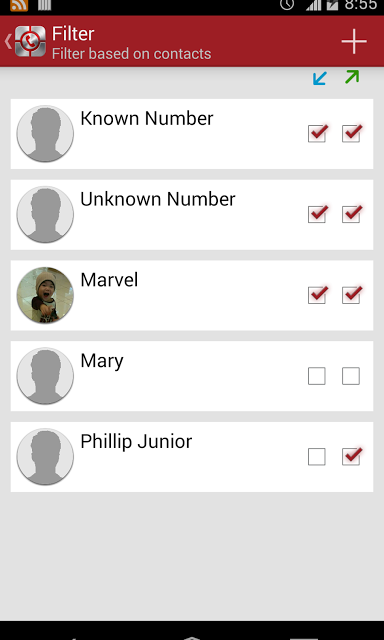
-Automatic filter recording based on 'Known Number', 'Unknown Number', and selected contacts (incoming / outgoing call)
-Advance rename recording files
-Show / hide recording notification
-Auto delete recording if not reach certain time (optional)
-Show review after call (optional)
-Support mp3, amr, mp4, 3gp and wav audio format
-Customable channel (mono/stereo), sample rate, and bitrate
-Gain volume (multiply audio input) with mp3 format
-Auto cleanup unsorted recordings for certain time (optional)
-Support trash folder to avoid accidental deletion
-Auto delete trash regularly
-Change recording home folder
-Backup and restore setting
-Support 4 digit passcode
-Totally hide application (seamless recording)
-Play recording in the background (recording still play when press home button)
-Automatic upload to Dropbox or / and Google Drive in the background
There are a few things, however, that yo unwed to keep in mind before using this app - due to limitation of Android phone (hardware and software), this program only can record from microphone. Please turn on the loudspeaker during your conversations make sure that the recorded voice is loud and clear. All conversations are recorded under file “RecordMyCall” file in memory card.
Also, the permissions that you require to use Android Call Recorder are:
Read Phone Status: Detect incoming + outgoing call
Record Audio: Record call
Read Contacts: Filtering contact (which recorded or not) + Renaming file based on contact name
Read / Write Storage: Store recording files on USB storage or SD-card
Google Account: Upload recordings to Google Drive for backup
Internet Connection: Upload recordings to Google Drive + Dropbox for backup
Bluetooth: Different action if phone connected to Bluetooth
Prevent From Sleeping: Prevent fail recording for long call
Change Audio Setting: Turn on loudspeaker by option
So whether or not you have rooted your android device, if it does not have a call recording function and you really want to be able to enjoy recording calls effortlessly for professional or personal reasons, Android Call Recorder is a good option.
There are a few things, however, that yo unwed to keep in mind before using this app - due to limitation of Android phone (hardware and software), this program only can record from microphone. Please turn on the loudspeaker during your conversations make sure that the recorded voice is loud and clear. All conversations are recorded under file “RecordMyCall” file in memory card.
Also, the permissions that you require to use Android Call Recorder are:
Read Phone Status: Detect incoming + outgoing call
Record Audio: Record call
Read Contacts: Filtering contact (which recorded or not) + Renaming file based on contact name
Read / Write Storage: Store recording files on USB storage or SD-card
Google Account: Upload recordings to Google Drive for backup
Internet Connection: Upload recordings to Google Drive + Dropbox for backup
Bluetooth: Different action if phone connected to Bluetooth
Prevent From Sleeping: Prevent fail recording for long call
Change Audio Setting: Turn on loudspeaker by option
So whether or not you have rooted your android device, if it does not have a call recording function and you really want to be able to enjoy recording calls effortlessly for professional or personal reasons, Android Call Recorder is a good option.
Newsletter
Get the latest tech news delivered to your inbox weekly.