

 format. It’s fun and easy to use and you’ll find yourself downloading apps that you didn’t even know you needed.
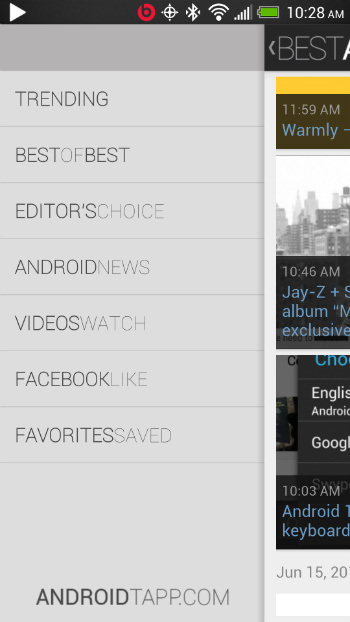
Here’s how Best Android Apps works. Apps are separated into a number of different categories, including:
-Trending
-Best of the Best
-Editor’s Choice
-Android News
-‘Videos Watch’
-‘Facebook Like’
-Favorites Saved
-Top Categories (which includes email, music, kids, games, education, tablet apps, and more categories)
As you can see, some of these categories aren’t really apps, but are instead news categories and blog articles. Apps are also lumped into groups, such as the “5 Best To Do Lists Android Apps” or “8 Best Microsoft Office Apps for Android”.
Users of Best Android Apps can read reviews of the apps along with general Android advice. The app is constantly updated with news articles previewing upcoming app releases and the most popular apps of the day. You can share apps you like by tapping the ‘share’ button in the top right corner of your page.
The Best Android Apps app isn’t perfect. It’s supported by ads, and a misplaced tap could take you to the page of an expensive paid app or other website. It’s also basically a blog in mobile form that simply links you to the Google Play Store. Some people appreciate having a middle man like this, while others will simply decide to visit the Play Store instead.
Anyway, the app is beautifully designed and the interface is easy to figure out. If you’re looking for an easy way to find some of the hottest new apps trending on the Paly Store this week, then you can download Best Android Apps here.
format. It’s fun and easy to use and you’ll find yourself downloading apps that you didn’t even know you needed.
Here’s how Best Android Apps works. Apps are separated into a number of different categories, including:
-Trending
-Best of the Best
-Editor’s Choice
-Android News
-‘Videos Watch’
-‘Facebook Like’
-Favorites Saved
-Top Categories (which includes email, music, kids, games, education, tablet apps, and more categories)
As you can see, some of these categories aren’t really apps, but are instead news categories and blog articles. Apps are also lumped into groups, such as the “5 Best To Do Lists Android Apps” or “8 Best Microsoft Office Apps for Android”.
Users of Best Android Apps can read reviews of the apps along with general Android advice. The app is constantly updated with news articles previewing upcoming app releases and the most popular apps of the day. You can share apps you like by tapping the ‘share’ button in the top right corner of your page.
The Best Android Apps app isn’t perfect. It’s supported by ads, and a misplaced tap could take you to the page of an expensive paid app or other website. It’s also basically a blog in mobile form that simply links you to the Google Play Store. Some people appreciate having a middle man like this, while others will simply decide to visit the Play Store instead.
Anyway, the app is beautifully designed and the interface is easy to figure out. If you’re looking for an easy way to find some of the hottest new apps trending on the Paly Store this week, then you can download Best Android Apps here.
How to Use an App Called “Best Android Apps” to Download Your New Favorite Apps
3 min read
There are so many thousands of apps on the Google Play Store that it would take a lifetime to sample every one. And with new apps being released every day, even dedicated Android users have trouble keeping up.
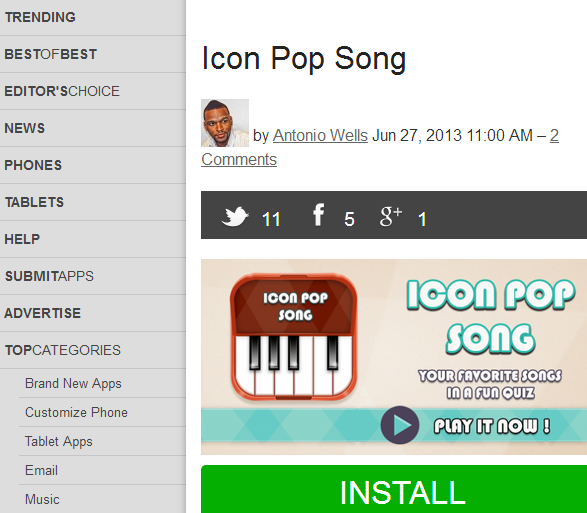
That’s why a new app called Best Android Apps is proving to be a helpful solution. Best Android Apps was developed by Android fansite AndroidTapp.com. At that site, visitors can discover some of the hottest trending apps, top rated apps, and best apps in a number of different categories.
In fact, if you visit AndroidTapp.com, you’re basically seeing the desktop version of the app. The mobile version – available for free from the Google Play Store – basically condenses all of the information on the site down into an easy-to-read mobile
format. It’s fun and easy to use and you’ll find yourself downloading apps that you didn’t even know you needed.
Here’s how Best Android Apps works. Apps are separated into a number of different categories, including:
-Trending
-Best of the Best
-Editor’s Choice
-Android News
-‘Videos Watch’
-‘Facebook Like’
-Favorites Saved
-Top Categories (which includes email, music, kids, games, education, tablet apps, and more categories)
As you can see, some of these categories aren’t really apps, but are instead news categories and blog articles. Apps are also lumped into groups, such as the “5 Best To Do Lists Android Apps” or “8 Best Microsoft Office Apps for Android”.
Users of Best Android Apps can read reviews of the apps along with general Android advice. The app is constantly updated with news articles previewing upcoming app releases and the most popular apps of the day. You can share apps you like by tapping the ‘share’ button in the top right corner of your page.
The Best Android Apps app isn’t perfect. It’s supported by ads, and a misplaced tap could take you to the page of an expensive paid app or other website. It’s also basically a blog in mobile form that simply links you to the Google Play Store. Some people appreciate having a middle man like this, while others will simply decide to visit the Play Store instead.
Anyway, the app is beautifully designed and the interface is easy to figure out. If you’re looking for an easy way to find some of the hottest new apps trending on the Paly Store this week, then you can download Best Android Apps here.
format. It’s fun and easy to use and you’ll find yourself downloading apps that you didn’t even know you needed.
Here’s how Best Android Apps works. Apps are separated into a number of different categories, including:
-Trending
-Best of the Best
-Editor’s Choice
-Android News
-‘Videos Watch’
-‘Facebook Like’
-Favorites Saved
-Top Categories (which includes email, music, kids, games, education, tablet apps, and more categories)
As you can see, some of these categories aren’t really apps, but are instead news categories and blog articles. Apps are also lumped into groups, such as the “5 Best To Do Lists Android Apps” or “8 Best Microsoft Office Apps for Android”.
Users of Best Android Apps can read reviews of the apps along with general Android advice. The app is constantly updated with news articles previewing upcoming app releases and the most popular apps of the day. You can share apps you like by tapping the ‘share’ button in the top right corner of your page.
The Best Android Apps app isn’t perfect. It’s supported by ads, and a misplaced tap could take you to the page of an expensive paid app or other website. It’s also basically a blog in mobile form that simply links you to the Google Play Store. Some people appreciate having a middle man like this, while others will simply decide to visit the Play Store instead.
Anyway, the app is beautifully designed and the interface is easy to figure out. If you’re looking for an easy way to find some of the hottest new apps trending on the Paly Store this week, then you can download Best Android Apps here.
Newsletter
Get the latest tech news delivered to your inbox weekly.