

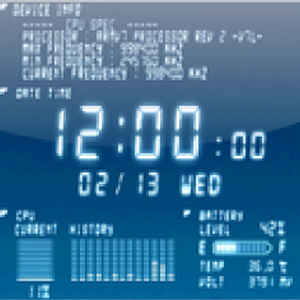
 Below is the information which will be shown.
-Date/Time(Digital clock)
-CPU Usage(with history)
-Battery remain/temperature/voltage
-RAM Usage
-Internal Memory Usage
-External Memory Usage(SD-Card)
-Tilt
-Compass
-Network connection state
-Wifi setting information
-CPU spec
-Device basic information
-Platform information
This LWP was also designed with consideration for the low-power consumption. If you are wondering how to go about using this app, here is how:
Go to menu(home) -> wallpaper -> live wallpaper -> Device Info to view this wallpaper.
Below is the information which will be shown.
-Date/Time(Digital clock)
-CPU Usage(with history)
-Battery remain/temperature/voltage
-RAM Usage
-Internal Memory Usage
-External Memory Usage(SD-Card)
-Tilt
-Compass
-Network connection state
-Wifi setting information
-CPU spec
-Device basic information
-Platform information
This LWP was also designed with consideration for the low-power consumption. If you are wondering how to go about using this app, here is how:
Go to menu(home) -> wallpaper -> live wallpaper -> Device Info to view this wallpaper.
Device Info Live Wallpaper - Go Beyond Aesthetic Appeal
3 min read
Whether or not you have rooted your Android device, you must have been often advised against putting up live wallpapers. This is because live wallpapers stop our devices form running optimally. While it may be enjoyable, it greatly reduces the speed of the Android device over time as it consists of files that keep running in even when the Android device is not in use. Thus, live wallpaper apps not only eat up your precious battery, they even slow down the overall functioning of the phone. And all this for what? A wallpaper that we usually lose interest in in some time. It is not even exciting anymore but it stays, and we get used to it without realising the we are paying the price in terms of the speed of our smartphones.
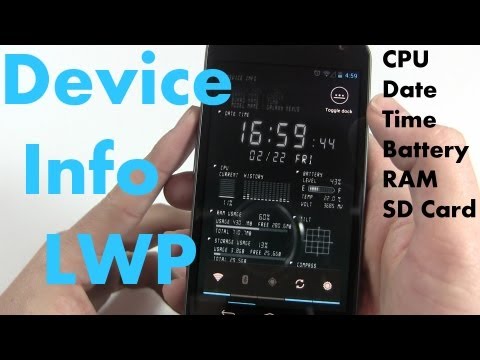
However, if you have to have a live wallpaper on your android device, it might as well be something that gives you more than just aesthetic value. It has to be something that is helpful. Cue Device Info Live Wallpaper - the live wall paper that is actually worth it! Device Info Live Wallpaper will indicate various device information of your phone in a cool way, snappily!
Below is the information which will be shown.
-Date/Time(Digital clock)
-CPU Usage(with history)
-Battery remain/temperature/voltage
-RAM Usage
-Internal Memory Usage
-External Memory Usage(SD-Card)
-Tilt
-Compass
-Network connection state
-Wifi setting information
-CPU spec
-Device basic information
-Platform information
This LWP was also designed with consideration for the low-power consumption. If you are wondering how to go about using this app, here is how:
Go to menu(home) -> wallpaper -> live wallpaper -> Device Info to view this wallpaper.
Below is the information which will be shown.
-Date/Time(Digital clock)
-CPU Usage(with history)
-Battery remain/temperature/voltage
-RAM Usage
-Internal Memory Usage
-External Memory Usage(SD-Card)
-Tilt
-Compass
-Network connection state
-Wifi setting information
-CPU spec
-Device basic information
-Platform information
This LWP was also designed with consideration for the low-power consumption. If you are wondering how to go about using this app, here is how:
Go to menu(home) -> wallpaper -> live wallpaper -> Device Info to view this wallpaper.
Newsletter
Get the latest tech news delivered to your inbox weekly.